Friday, December 16, 2016

Mouse

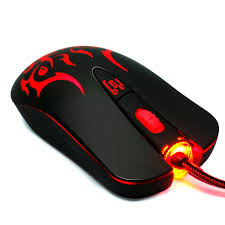
The computer mouse is a hardware belonging to the input device (input). The function of a computer mouse is set the cursor movement quickly, and also to give an order by simply pressing a button on a computer mouse. Within this mouse device, there is a small ball that will capture mouse movements and transfer electrical signals to the processing device (CPU). Thus, a computer mouse can quickly perform performance as an input device.
Here you can see some of the computer mouse functions:

  1. Give commands to the computer by moving the mouse in the special surface computer mouse (Mouse Pad).
  2. Shows the location of the node exit on the screen.
  3. Conducting enter a command called: click, double (double click), click hold and drag (drag and drop click), and right-click.
  4. Scrolling the screen to see all parts of the program that is being opened by moving the scroll wheel.
  5. Accelerate and facilitate the work of graphic design, gaming and so on.
  6. Controls the visual objects.
  7. Enabling the command button and perform commands on an application.
  8. Zooming in and out the worksheet.
  9. Transfer the electronic signals from the movement of the mouse leading to the processing device. And many more.

How to Make a Computer Network LAN


To be able to connect between computers, usually using a LAN network cable media. If the LAN network only consists of two computers we will only need a UTP cable by the connector at both ends.

Connector we can get in a computer store, while a good idea to adjust the cable length distance between the location of one computer to another computer.

Meanwhile, if we connect the computer to be in excess of two, then we will need an additional device that is often called Switch or HUB. And to make computers can communicate with each other.

Then each computer must lan given the IP address of each. To verify whether the LAN computer network is successful, then we must examine one by one to the entire computer.

LAN computer network created not without purpose, but as a medium for the exchange of data / information, using resources at the same time within a computer network, as well as communication between computer users, and share the Internet connection that can be done easily and quickly.

COMPUTER NETWORK LAN


In general, a computer network can be divided into three types, namely LAN (Local Area Network), MAN (Metropolitan Area Network), and the latter is a WAN (Wide Area Network). But we shall see this time is a computer network that has the smallest range diatara three, namely LAN (Local Area Network).

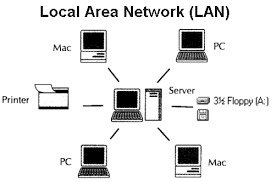
Computer Network LAN is a computer network that consists of a few things to computers that have a limited range in a relatively narrow area. LAN network example that we often encounter is the LAN network in the cafe, library, Lab School, and others.

LAN computer networks in general are mutually muntuk network used to connect multiple computers into a single entity in order to share data and resources such as a printer, scanner, modem at the same time.

Network LAN LAN is also divided into traditional and modern LAN. The most fundamental difference in this network is in terms of speed of operation. Traditional LAN networks have a level of operating speeds range from 10 up to 100 Mbps (megabytes / second).

While modern LAN network have an average speed that far surpasses it, which can reach speeds of up to hundreds of Mbps.

Fifth Generation Computer

Fifth generation computers are currently being carried out by various vendors electronically. Yes, the fifth generation computer is often referred to as the next generation computer. Some small evidence is the emergence of smartphones, tablets, phablet, netbook, ultrabook, and lots more.

The next development is a computer tool that can be run without having to use physical contact (touching), but use your brain. Then, will the fifth generation computer is realized? Only time that can answer.

Fourth Generation Computers


In this generation, which uses computer chip IC later developed. Very Large Scale Integration company trying to do the development in the 1980s. As a result, a single chip can hold thousands of components.

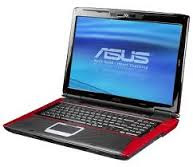
From here, the term "personal computer" or PC appears. That is, the computer began to be marketed to individual sectors. Do not stop there, there arose a computer device that is easy to carry anywhere, the Laptop.

Third Generation Computers


In use, the transistors make computer faster heat. Thus, the second generation of computers becoming obsolete. Then a scientist named Jack Billy tried to do some research. Then in 1958, he created the components are more sophisticated than the transistors that make fast computer last summer. Namely IC, or integrated circuit tiny chip that can accommodate many components into one.

By doing so, the size of computers become smaller. Also, the third-generation sector is also faster operating system and capable of running multiple programs simultaneously.

Second Generation Computers


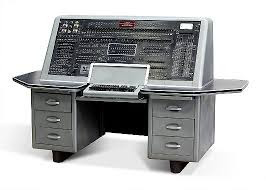
An important discovery has occurred in this second generation. Is a transistor, a powerful tool that can maximize computer performance with a very small size. The discovery of these tools affect the development of computers in the second generation. In the 1960s, scientists tried to work on the second generation of computers.

Some agencies, corporations, universities, and the government has been to leverage the power of second generation computers. The essence of the invention are the second generation of transistors, which made the second generation is smaller than the first generation.